

Permissions and approvals
Claude Code and Codex ask before they do something risky. Sesame Link brings those questions to wherever you are, and your computer decides what a remote client may do.
Pi uses its own execution environment and permissions. Sesame Link does not add approval enforcement or a sandbox to Pi, and Pi’s native dialogs must be answered in its terminal. See Pi.
Answer prompts remotely
Section titled “Answer prompts remotely”A permission prompt appears in the web client and to your Sesame agent, with the same choices the runtime offers. Answer it from any client, or in the terminal. This includes Claude Code’s prompt to trust a new folder: you can accept it from any client, but Sesame Link never accepts it for you.
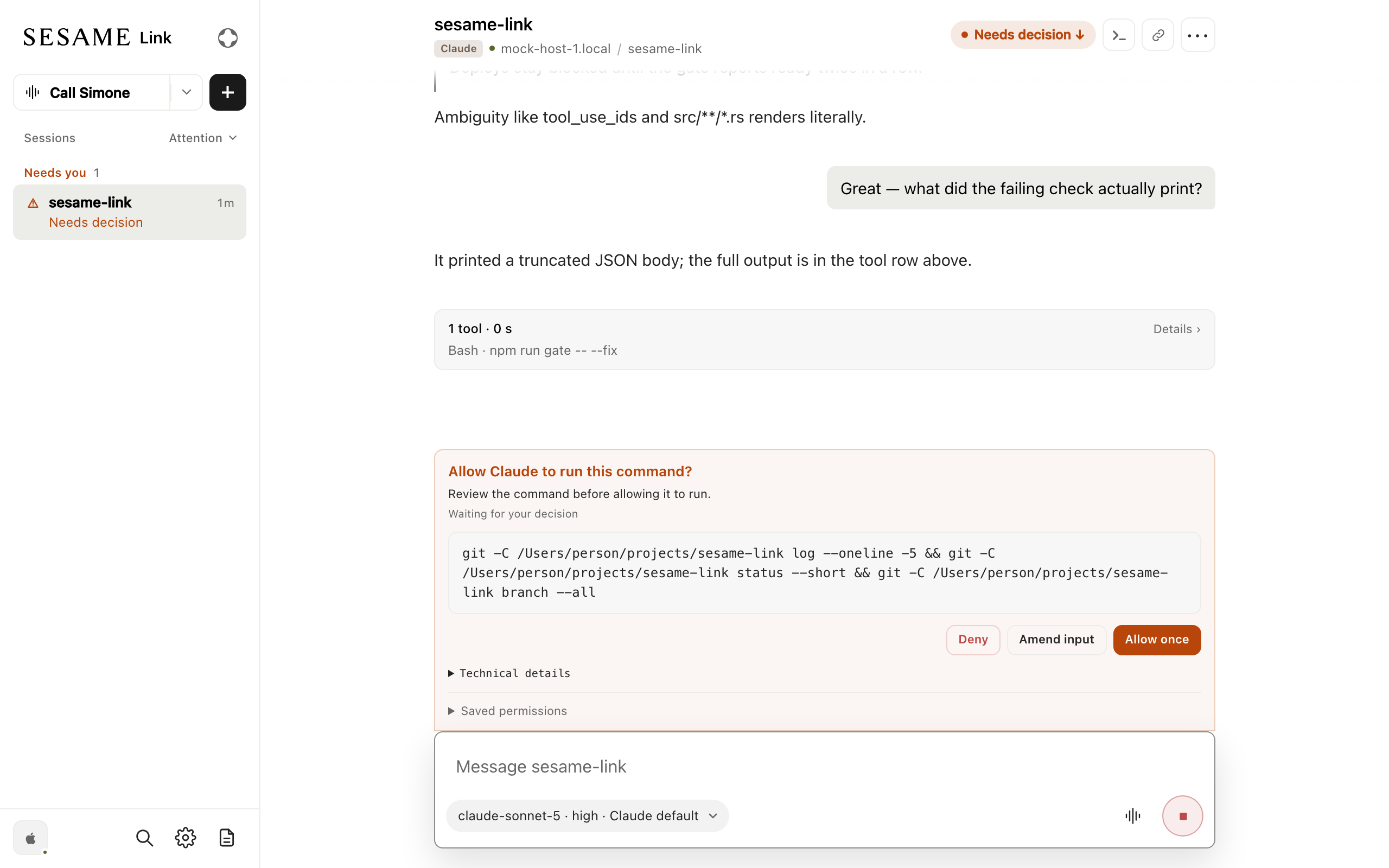
If no client has the session open, a prompt waits three minutes, then moves to the terminal. Your Sesame agent can’t approve a request it can’t read aloud in full; see What needs a screen.
Permission modes
Section titled “Permission modes”A remote client can start a Claude Code session in these permission modes: Manual (Claude asks before acting), Accept edits, Plan, Auto, and Don’t ask. In the web client you pick one when you create the session. Sessions your Sesame agent starts use Auto.
Remote clients can’t use Bypass permissions unless you allow it on that computer; see Change what remote clients can do.
What stays at the terminal
Section titled “What stays at the terminal”Some things only the person at the computer can do:
- Shell and most slash commands: remote messages that start with
!are refused, and so are messages that start with/, except the slash commands listed below. - Files outside the session’s folder: remote messages can’t
@-mention them.
Slash commands
Section titled “Slash commands”A remote client can run a few built-in slash commands in Claude Code sessions. Send the command as the whole message:
| Command | What it does |
|---|---|
/compact or /compact <instructions> |
Summarizes the conversation so far, optionally following your instructions. |
/clear |
Starts a new conversation in the same session. |
/context |
Shows how much of the context window is in use. |
/reload-skills |
Picks up skills added or changed during the session. |
In the web client, typing / lists the commands this computer allows. Codex sessions don’t run
slash commands remotely yet. Pi supports /compact (with optional instructions), and /reload
when the computer permits it; both require an idle session.
Commands that open a menu in the terminal, such as /status or /model, are never available
remotely.
Change what remote clients can do
Section titled “Change what remote clients can do”Each computer’s limits live in ~/.local/state/sesame-link/remote-access.json. Run
sesame-link restart after editing it.
allowed_remote_runtimeslists the coding tools remote clients may start sessions with, such as["claude_code", "codex"]. It allows every tool by default. Sessions already running are not affected, and you can still start any tool from this computer.allowed_permission_modeslists the permission modes remote clients may use. To also allow Bypass permissions, set it to["manual", "acceptEdits", "plan", "auto", "dontAsk", "bypassPermissions"].allow_claude_persistent_rulesandallow_claude_persistent_directorieslet remote clients accept Claude’s “always allow” suggestions that Claude saves to its settings files. Both arefalseby default; suggestions that last only for the running session always work.allowed_remote_slash_commandslists the slash commands remote clients may run. It defaults to["compact", "clear", "context", "reload-skills"]; set it to[]to refuse them all. You can also add:"reload"to allow Pi’s/reload, which reloads its extensions."autocompact"to allow/autocompact autoor/autocompact <tokens>. Claude Code saves this setting for every session on the computer, local ones included."reload-plugins"to allow/reload-plugins, which activates plugin changes, including their hooks and MCP servers.
allow_remote_bash_commandslets remote messages that start with!run as shell commands in the session’s folder. It isfalseby default.